
Alert only on some units: alert rules
In this article
Alert rules apply to the whole organization. They decide which events are alerted, for which units and at what times.
Before you start
- You need the Administrator or Fleet manager role.
- While there are no rules, the rules screen says "With no rules, you get alerts for every event." Once you create the first one, it says "Only events covered by a rule trigger alerts."
Steps
- On the map, open Settings (the gear).
- Go to Alert rules and tap Add. New alert rule opens.
- In Event type, choose which event the rule alerts on, for example "Overspeed". The list is grouped into Always work, Need setup and Depend on the device, and each event says what it needs.
- In Applies to, choose All devices or Groups and devices. With the second option you can check groups, single units or both, and below you see how many units the rule covers. Below that we also tell you which of those units don't have what the event needs, with a link to set it up. It's only a heads-up, and you can save the rule anyway.
- If you want the rule to apply only at certain times, choose a calendar in Schedule. If you do not choose one, the rule applies at any time and shows as Always active in the list.
- Tap Add. When you edit a rule that already exists, the button says Save.
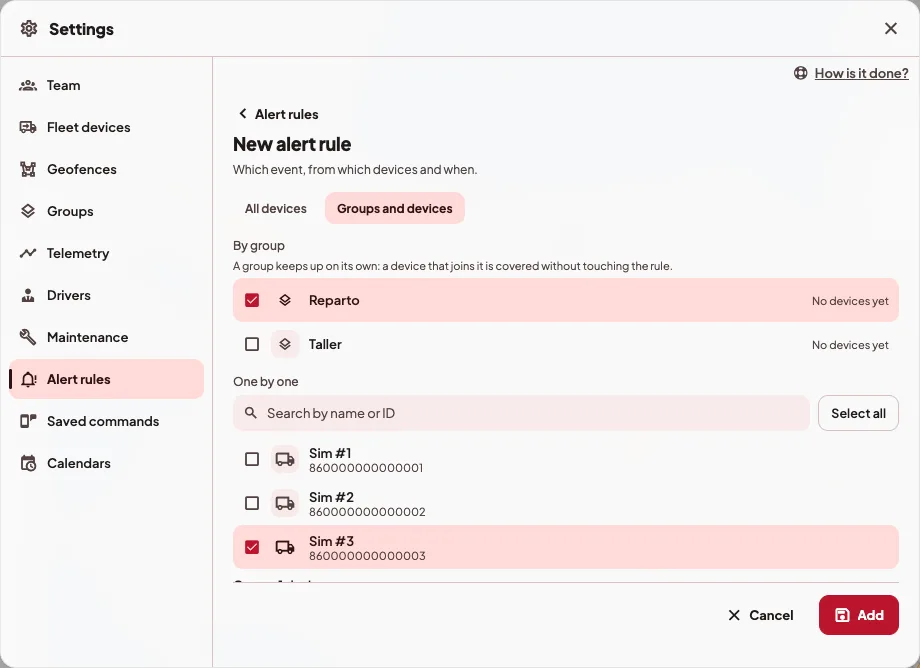
It is easier to build rules by group. That way, when a unit joins a group, the rule already covers it and there is no need to edit it.
Example
Say you want to hear about speeding only from the trucks, and about any SOS. For that you build two rules.
- The first one with Overspeed and Groups and devices, with the "Trucks" group checked.
- The second one with SOS alarm and All devices.
With those two rules in place, the other events stop being alerted.
Events that need setup
A rule only filters what happens. If a unit doesn't have what the event needs, that event won.t happen on it and the rule has nothing to alert.
- Overspeed: the limit is set on each unit, under Advanced settings in its details, or on its group.
- Geofence entry and exit: only the geofences linked to the unit or to its group count.
- Maintenance, fuel drop and inactivity also need a setting on the unit or on its group.
- Ignition on and off, driver change, low battery and alarms depend on the device sending that information.
Rules and each person's preferences
Rules decide which events are alerted in the organization. Within that, each person chooses in their alert preferences which ones they get and through which channel.
If something goes wrong
- Alerts that used to arrive stopped. Once a rule exists, only what some rule covers is alerted. If you want them back, add a rule for that event.
- I deleted a rule and now everything arrives. If it was the last rule, every event is alerted again.
- "Choose at least one group or device for the rule." When you choose Groups and devices, the rule needs at least one group or unit checked.
On your phone
The rules are in Management › Alert rules, with the same fields.