
Manage your subscription: change plan, pause or cancel
In this article
From Subscription & billing you can change plan, update the card, download receipts, and pause or cancel the service.
Before you start
- You need the Administrator role.
- This is done on the web only, because the store rules keep payments out of the Android and iPhone apps.
- If the screen shows Payments are off, it is because there are no online payments for now. In that case the options to change plan, change the card and pause do not appear, and you can write to us to activate or change your plan.
Get to the subscription
- Open your user menu and go to My account.
- Under Organization, open Subscription & billing.
At the top you see your Current plan, its status and the Next charge.
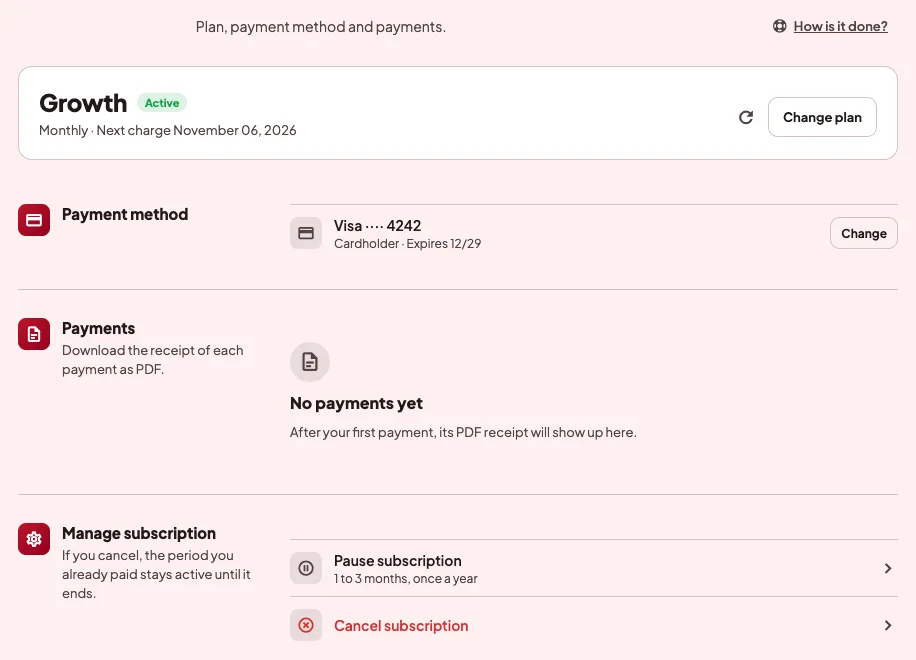
Change plan
- Tap Change plan.
- Choose the Billing cycle: Monthly or Annual.
- Choose the plan and tap Select plan.
- Review the summary, where you see until when your current plan runs, when the new one starts and when it is charged.
- Tap Confirm change.
If you change your mind before the new plan starts, tap Keep … to stay on the current one.
Change the card
- In Payment method, tap Change.
- Accept Wompi's terms and the personal data authorization.
- Type the card in Wompi's secure window. Only credit or debit cards are accepted.
If you have a pending payment, the button says Update and pay …, and the balance is charged when the card is saved.
Download receipts
In Payments, tap See all. Each payment has its PDF receipt, which you can download from the list.
Pause
- In Manage subscription, tap Pause subscription.
- Choose the Pause length, from 1 to 3 months.
- Read the summary and tap Pause.
While it is paused there are no charges and nobody in the organization sees live tracking, but data keeps being saved. When you come back, you get back the days you had left in the period.
You can pause once a year. If you want to come back before the date, tap Resume.
Cancel
- In Manage subscription, tap Cancel subscription.
- Tap Confirm cancellation.
From then on there are no more charges, and the period you already paid stays active until it ends. If you change your mind before that day, tap Keep subscription.
If something goes wrong
- "Access restricted". The subscription has a pending payment, or it is suspended, paused or cancelled. Manage subscription shows what happened and how to continue.
- "We saved the card, but the payment was declined." The bank did not approve the charge. You can try another card or check with your bank.
- "You already paused this year. You can pause again from …" A pause can be used once a year, so the option comes back on the date in the message.
- On the phone it says "Your account administrator can help". Payments are not made from the app. To manage them, sign in on the web with an administrator account.